Quick Demo
Introduction
There have been an increasing variety of coding agents recently. Each one getting more integrated and comprehensive than the last. I’ve been lucky enough to have been able to try a couple of these not only on my own free time, but as part of an implementation task at my work to integrate these agents into some of the development workflows.
I remember trying CrewAI, a multi-agent AI system, and trying to hack together our own coding agent. It did well enough… but it’s not what CrewAI was meant for.
Then Codex came along and did what our hacky system did way better and more precisely with fewer errors. The learning experience was valuable nonetheless. Because that’s what it was meant for. It reads your codebase and prepares itself with the right context.
Then I saw over on Devpost that there was a hackathonfor one of the newest coding agents around the block: Kiro
What Is Kiro?
Plainly, Kiro is an AI-powered Integrated Development Environment. So unlike codex it comes with a full coding environment and extra purpose-specific features on top of it. Those features include but are not limited to:
- Creating agent hooks: Agent automation that runs after a specific trigger that you set. For example, you can literally ask Kiro to create an agent hook that updates test files every time the relevant files change; Kiro will automatically create this hook for you.
- Steering docs: You can ask Kiro to generate steering documents for your project. This will give Kiro AND yourself a better understanding of the whole structure of your project. I find this is especially useful for older projects you’ve inherited from other devs. This way you don’t have to waste much time studying legacy code.
Actually, why even read the docs yourself. Just ask Kiro about the codebase. Now thanks to the steering docs, it can answer your questions better and more accurately. E.g. “How are the real time messages handled within this application? Where did they place the socket listeners?”. You no longer have to trace it down from the very beginning of the app flow.
Spec-Driven Development
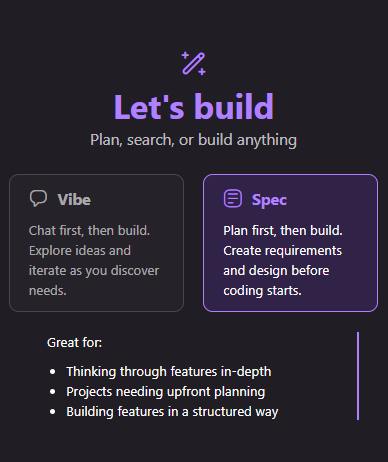
Here’s what I think sets apart Kiro from other coding agents: Spec-Driven Development. A common denominator between most of the coding agents is how you usually approach development: vibe coding.
You say what you want, and the agent gives you the code: prompt -> code. But Kiro, while still providing the option to vibe code, provides a more thorough alternative. This is spec driven development:

Prompting in this mode won’t get you code straight away; instead, Kiro will think through your request(s), plan accordingly, create an appropriate spec folder, and fill it with relevant specification documents, namely:

This will be generated for you to review before you move on to implementing the code. That’s what I really like about this. That buffer stage you can utilize to check if what the agent is planning to do matches with what you want.
Beside basic implementation, it will also require and list thorough testing that it will execute for you. So once you’re satisfied with the spec, you can go ahead and start the tasks in the tasks.md.
Kiro will also fix any errors it finds during testing
What I Built
I had noticed that I had been losing my ability to focus lately. Reduced attention spans and easily distracted — basically that brainrot thing people keep mentioning online. It had been hard to pry my attention off just doom scrolling and opening X/Twitter. It was literally impossible for me to do a focus session without getting distracted.
Then I saw this really good video on dopamine detox. The essence is basically this: My brain has been getting too much frequent high-dopamine, fast reward activities — like scrolling Reddit or watching Shorts. My brain got used to these and basically dampened my receptors towards sustained, low-intensity reward over time. That’s why I couldn’t stay focused on my work for a long time.
It also said that my brain would benefit more from a more rigid system of work THEN reward. It also said it would benefit from gamification. That’s the core fusion/chimera idea this project.
An Chrome Extension that Combines Productivity with Fun
I then came up with “Soulful Sessions”. A Halloween themed Chrome Extension that combines those two core ideas: work THEN reward AND gamification.
I also came up with a unique concept/theme surrounding the core functionality of the extension. To stick with the prompt’s Halloween theme: I came up with the center idea of “soul collecting”.
This is one of the most underrated benefits of Kiro. Allowing me to put more attention to the creative side of this project.
You play as the “Soul Shepherd”, a benevolent grim reaper-like character who collects souls and lead them into a better place. You have stats like Spirit (attack), Soulflow (how fast you idly generate resources), and Harmony (basically critical chance).
There’s two types of gameplay here:
-
idle: where you generate “Soul Embers” (main currency) passively. The idea is the Soul Shepherd collects “content souls”. Souls that are ready to move on. So there’s no effort required. You just generate Soul Embers based on your current stats. -
bosses: where you battle a “Stubborn Soul”, souls that are not ready to move on yet, even though it’s their time. These are like campaigns or bosses on games. Each boss has a unique name, backstory, and “Soul Resolve” (health points).
You defeat these Stubborn Souls by doing “Focus Sessions”. A period you start during which you cannot visit discouraged or blocked sites you’ve set in the settings. After each focus session, you deal damage to the boss according to your stats.
For example: let’s say I’ve set facebook.com as one of the discouraged sites, and youtube.com as one of the blocked sites.
During a focus session, if I tried to visit Facebook, I’ll get a light warning saying my session has been compromised and that my rewards have been reduced. But I’ll still be able to click around in it, since I only have it as discouraged.
If I visited YouTube, since it’s in the blocked list, I’ll actually be immediately redirected to a special page saying I can’t visit it. So no chance for me to actually get distracted by YouTube.
Then, once the focus session is over, depending on a couple of factors including whether or not my session was compromised after visiting a discouraged or blocked site, I’ll get my rewards, which are the Soul Embers we talked about and “Soul Insight”, the XP with which you level up.
Then we enter “Break Mode”. This is the reward part of work THEN reward. We’ll be able to do lots of things during this period, including using the Soul Embers we generated to upgrade skills and buy cosmetics: “Themes” and “Sprites” (your Soul Shepherd’s unlockable skins).
If you leveled up, you also get skill points to use on upgrading your skills. Since upgrading skills using Soul Embers gets exponentially more expensive as you do it.
That’s the core of the app, but I’ll show you screenshots of the whole extension a little further below. For now let’s talk about developing using Kiro:
Starting with One Manifest File
Alright, I’ve rambled on long enough. Let’s get to coding– or rather let’s let Kiro get to coding.
I actually made it a point to let Kiro do most of the coding and debugging. A sort of “stress test” for this new tech I’ve discovered. To that end, I gave Kiro almost next to nothing to start with: A Chrome extension manifest JSON file.
Looking back, I probably could’ve given Kiro an empty folder and it would’ve still worked.
Then I turned on Kiro’s spec mode and gave it a MASSIVE and detailed description of my whole app. I basically listed the entire extension idea I had after a couple hours of brainstorming.
Here’s a glimpse of my first prompt:
---
Core Fantasy & Tone

You are a **gentle Grim Reaper** type – more guide than killer.

* You help **Content Souls** (peaceful, ready-to-move-on spirits) pass on.
* You work to calm **Stubborn Souls** (bosses) who cling to unfinished business.
* Everything is **spiritual, emotional, non-violent**: persuasion, soothing, guiding, not attacking.

Think of Death as a mix of therapist, guide, and cosmic janitor.

---
TRUNCATED

...AROUND 400 MORE LINES OF IDEAS AND FEATURE REQUESTS...

---

Daily User Experience (End-to-End)

1. User installs extension.
2. Opens Options Page:

   * sets focus length (e.g. 25 min)
   * lists distraction sites
   * sets goals/tasks/subtasks
3. Clicks extension → Popup:

   * chooses task to work on
   * starts focus session
4. During session:

   * popup locked with simple message
   * background tracks time & distractions
5. Session ends:

   * notification: “Your ritual is complete.”
   * popup shows rewards (Soul Insight, Soul Embers, boss progress)
6. Break:

   * user checks game, upgrades stats, watches idle souls being collected
7. After break:

   * nudged to start another session
   * rinse, repeat: this is their new Work → Reward / detox loop.
Again, I really wanted to stress test my new friend, Kiro, here. It generated a giant spec for me and listed a whopping 42 tasks in the tasks.md.
I looked through the documentations and then when satisfied, I ran all 42 tasks.
Sidenote: Creating an Agent Hook
Quick detour! I wanted to mention that I created a automatic hook to help organize my commits as Kiro performs the tasks it gave itself.

And yes, you can ask Kiro to create a hook for you. This worked well enough, except that agent hooks and tasks all fall under one category: a task. So when you simultaneously queue all your tasks, this agent hook will only be queued at the bottom (after all the tasks) and therefore you’ll only activate this hook for the last task.
I’m sure there’s some hack you can do though, maybe instead of queuing all the tasks, you could let Kiro do that. Maybe create a last commit file, let the previous agent hook to also update that commit file and create another hook triggered by changes in that commit file to automatically start the next task.
Detour over!
Okay, where were we? Kiro ran all 42 tasks. It generated all the code and respective tests it outlined in the requirements. It executed all the tests. Here are some important observations I made:
- Kiro will prepare your project and install all the necessary packages for testing, if hasn’t already.
- Kiro will proactively fix all errors generated by the tests.
Okay, so it did its 42 tasks. How’d it do? It IS a big requirement list!
Can I load the extension?
Debugging with Kiro
Actually, I ran into some loading errors (can’t remember what — sorry!) from the first version generated by Kiro from that task list.
No surprise there though. The scope was so large it was practically guaranteed. Let’s see if we can let Kiro fix it itself. Enter vibe coding with Kiro. That’s right, I haven’t forgotten about it.
So I simply copied the error Chrome gave me and gave it to Kiro. I don’t even remember what it did, but it searched through my codebase again, thinking and talking to himself, and then… it’s fixed! I can load the extension without issue.
Pretty impressive!
Initial MVP
Before I show you the final product, I’d like to show screenshots of the first working iteration Kiro generated for me. Just to show you how it did, and how it compares to the final product:
Main Popup UI

This is the main UI where you start your focus sessions. It also lists all the important details about your current status. Skills, levels, Soul Embers.
Popup During Focus Session

Just like I asked it to, it disabled all game UI while focus session is active, so you can’t even get distracted by the app itself.
Discouraged and Blocked Sites

This is what happens when I visit a site I listed as “discouraged”. It does exactly as requested, giving a small warning to persuade players to get back to focusing.

And this is what happens when I enable strict mode and visit a site listed as “blocked”. Blocks are stronger than discouragement because it literally prevents me from visiting blocked sites by redirecting me to this special page. I call it “hard blocks” instead of the previous “soft blocks”.
Break Time


Once focus session ends, you’ll get a notification and the popup now goes into “Break Time” mode. This is the reward part of work THEN reward. During this limited reward time, you’ll get to upgrade your Soul Shepherd using Soul Embers or skill points you gain from leveling up.
If you have enough, you’d also be able to buy cosmetics during this time.
And as you can see, you will have done some spirit damage to the Stubborn Soul, resulting in its Soul Resolve (health) dropping some points.
Options page
Here are some features on the options page Kiro generated for me, including task management and distraction management, where you add sites to your “block list”:
Task Management Tab

Distraction Management Tab

Statistics

Theme Change
Here’s the popup after I unlocked a theme and applied it, just to show it worked:

There are a bunch of other tabs in the options page, but I’ll skip those just because it’s getting long.
Scroll down to see the comparison to the final product.
Adding Features with Kiro
I was pretty impressed already by the first iteration of my extension Kiro produced. I had used vibe mode to fix bugs and make minor adjustments.
But let’s go beyond that. As in real projects you’re unlikely to be done with just one iteration, no matter how flawlessly it went.
Let’s add a feature. I wanted to calibrate reward and boss damage calculations (Soul Embers and Boss Damage) based on the initial algorithm Kiro gave me. I wanted to easily check how much I earn through idling and through boss fights at different player and skill levels without having to actually level up– a way to simulate player status and circumstance. Because doing it manually while waiting for focus sessions would take ETERNITY!
So I went into spec mode again and asked Kiro to make this feature for me, and to add a new spec. Because this feature is big enough for me to want to be thorough.
I asked it to create a “dev screen”, separate from the extension, which can simulate player levels and skills and allow me to see how many rewards and how much damage would a player at any level or skills would get and do without having to do actual focus sessions.
I also specifically asked it to draw from the same sources and functions as the actual extension, so everything kept consistency, and so Kiro would only need to test in one place.
Of course, it generated the appropriate spec documents for me. I then subsequently ran all the tasks so Kiro could do it’s thing.
Here’s what it made me:

And this time it worked straight away. It gave me a script to build and run it at port 3000.
Again, this proves that Kiro works beyond just initial spec generation and implementation. You could use this on existing projects to add new features.
Captaining the Creative Ship with Kiro Vibe Code
This is the most precious part for me. Sometimes I really enjoy the creative process more than the engineering part. And Kiro allowed me to focus on that creative part!
And in this particular project, I really think I came up with a concept and theme that I seriously enjoy and am proud of! It’s simple but coherent, and I like the terminologies I came up with.
Thanks to Kiro, I could keep expanding upon the initial concept of “soul collectiong” while it translated my ideas into working code. While it worked on my code, I could let my mind travel back to the concept and come up with new stuff. And I did!
The boss bestiary or gallery screen was something I got the idea for while Kiro was doing its thing running tests for me!
Final Product
I won’t go into details for features already established in the MVP section, but I’ll explain any additions I requested Kiro beyond the first iteration.
Main Popup UI

Popup During Focus Session

Discouraged and Blocked Sites


Break Time

Options page
Here’s something interesting: In the statistic options tab, I asked Kiro to add a player card feature. Something concise and pretty to show off current progress using spec mode.
At first it designed the card on its own, as I didn’t give it any direction. It looked nice enough, but not what I envisioned.
So I drew a simple design on MS Paint and gave it to Kiro since you can paste pictures there.
Here was the design:

And finally after a few vibe code back-and-forth, here’s what I ended up with:

Not bad, eh?
Boss Bestiary or Stubborn Soul Gallery
And finally before I published I had a quick idea I wanted Kiro to implement. Most games with a variety of bosses always have a gallery of sorts you can view to look back on your progress and the road ahead. Here it is:

A list of bosses you’ve unlocked, guided (defeated), and ones you’ll get to unlock after leveling up.
When you click on an unlocked boss/Stubborn Soul:


To give player more motivation and direction, I added locked content for each boss for players to reveal once they’ve “defeated” each Stubborn Soul:
-
Final Conversation: A heartfelt dialogue where the Soul Shepherd helps each Stubborn Soul find peace and acceptance before they move on.
-
Resolution: A narrative epilogue that describes how the soul finally finds peace and moves on.
Here’s an example just for the first boss; I don’t want to spoil any more:

Conclusion
I definitely see myself using Kiro beyond the challenge context, especially when I want to focus on concept more than implementation. I also would like to try integrating MCPs into Kiro. Next project! Maybe I’ll integrate it with my local database so I don’t have to explain schema structures to it– a pain point I’m way too familiar with when it comes to code agents.